css selector performance
No matter where you look, no matter what sources you follow, if you read up on front-end development you cannot escape the reign of performance. As many studies suggest, websites need to be fast to perform well. People don't like to wait for their information but at the same time they demand richer experiences, so the page load is ever increasing. Performance testing has become a necessity but we should take care it doesn't turn into an obsession.

css selector performance
Not too long ago I wrote a piece on css selector simplification in order to reduce rendering times. I stated that performance should always be weighed against maintainability and correctness and still stand firmly behind that statement. But in order to weigh those two sides against each other you need proper data, so I figured It wouldn't hurt to check the performance impact of the css selectors on my blog.
My css selectors are quite verbose, I know that and I'm actually quite proud of it. Not particularly because of their verbose nature, but because their verbosity is a direct result of their correctness and maintainable nature. What you find in my css selectors is usually there for a good reason and taking things away would reduce the maintainability of the overall css. That does mean I use creepy stuff like the *-selector and tag selectors where necessary (rather than renaming my classes). Things that are often considered bad practice by reigning standards.
test results for an article detail page
I sampled one of the most complex pages on this blog, which is the article detail page (that's the template you're currently looking at). I found myself an article with a couple of comments, opened it in Chrome and used the Chrome CSS Selector Profiler (integrated in the Chrome web development toolbar) to measure a normal page load. The results were staggering:
Here's an excerpt of the test results (.png)
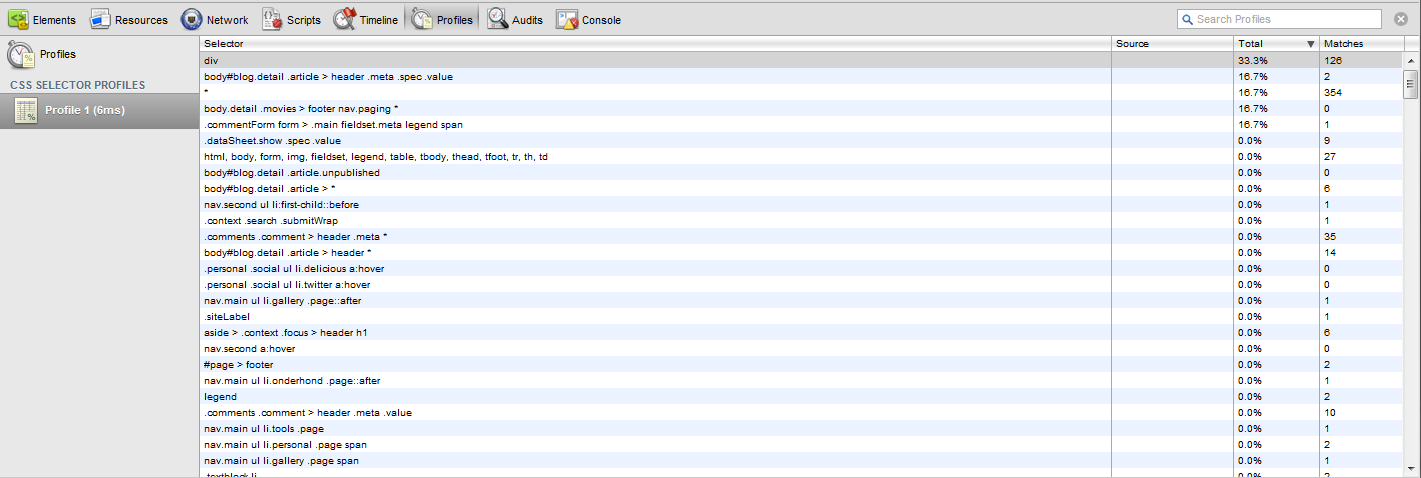
Six (6!) milliseconds. That's the bottom line, all this discussion we're having is about six measly milliseconds. So yeah, I could mangle my css selectors to bring it back to 3 or 4 milliseconds but I don't think people would actually notice. I know that performance optimization is a battle on many different fronts, where many small optimizations make a big impact, but there are much more interesting options to consider before ruining a perfectly good css file in the name of 2 milliseconds.
conclusion
One of the main problems here is that our human brain has trouble dealing with computer timings. Shorter and more specific css selectors make for faster dom searches, which increases performance. This is a perfectly logical (and valid) train of thought. And when you consider the work that comprises such a dom search it sounds like a good way to optimize performance. But computers are fast and what sounds like a lot of work for us is hardly worth the trouble for your trusty friend.
Always check your data before making performance calls, especially when they impact the maintainability and correctness of your code. Performance is a valid and worthwhile goal, but not at the cost of everything else.